

A DSLR camera gives travelers more creative control and image quality, which makes it a great choice for everything from boat tours and waterfront excursions to landscapes, wildlife, and city scenes. Small adjustments to camera settings, composition, and equipment handling can often make a noticeable difference in the final result. We will share the best DSLR photography tips to help you capture better travel photos, protect your equipment during your trip, and recover images after accidental deletion, formatting, memory card corruption, or other common data loss situations.
Photography Tips for Boat Tours and Water Excursions
Boat tours and other water-based adventures often provide some of the best travel photography opportunities. A few simple habits can help you capture better photos and avoid common mistakes while shooting on the move:
- Use a faster shutter speed. Movement from the boat can introduce blur, even on calm water. A faster shutter speed helps keep subjects sharp.
- Take photos during the golden hours. Early morning and late afternoon light often produces richer colors and softer shadows.
- Pay attention to reflections. Water can add depth and visual interest, but strong reflections may affect exposure and image quality.
- Protect your camera from moisture. Keep a microfiber cloth handy and store your equipment in a protective bag when it is not in use.
- Carry spare batteries and memory cards. Long days of shooting can quickly exhaust both.
- Avoid deleting photos during the trip. It is often easier and safer to sort through images after you transfer them to another device.
- Back up important photos regularly. A laptop, portable SSD, or cloud storage can provide extra peace of mind during longer journeys.
A little preparation can make a significant difference when you return home and review your photos. These simple practices help you focus on capturing memorable moments instead of dealing with avoidable problems.
How to Recover Deleted Photos from DSLR Camera
But what to do, if you accidentally deleted tour photos? We prepared two recovery methods that cover the most common DSLR photo loss situations, from accidental deletion to severe SD card problems. Before you start recovery, stop using the SD card immediately and avoid taking new photos or videos. We also recommend avoiding formatting the card again or saving recovered files back to the same storage device because this can overwrite deleted photos and reduce recovery chances.
The recovery process usually stays very similar regardless of the camera brand, so the methods in this article will work for Canon, Nikon, Sony, Fujifilm, Panasonic, Olympus, and most other DSLR cameras. Nikon users who work with NEF RAW files can also look up a separate guide on recovering deleted Nikon photos for more Nikon-specific examples and recovery details.
Method 1: Use Data Recovery Software for Deleted Photo Recovery
Data recovery software is usually the most reliable way to recover deleted DSLR travel photos. It scans the card directly and looks for recoverable image data that the camera or operating system no longer displays normally. We recommend starting with this method because it works well in the majority of logical data loss situations and does not require advanced technical knowledge.
Modern recovery tools support most DSLR photo formats, including JPG and RAW files from Canon, Nikon, Sony, Fujifilm, Panasonic, Olympus, and other camera brands. Some tools can also recover DSLR video footage and partially corrupted files. For this guide, we’ll use Disk Drill because it combines a beginner friendly interface with strong DSLR photo recovery support, preview functionality, RAW format compatibility, and advanced scanning modes for both photos and videos.
Here is how to use Disk Drill for camera photo recovery:
- Go to the official website and download Disk Drill for Windows or macOS.
- Install the app on your computer by following the on-screen instructions.
- Launch Disk Drill. When prompted by Windows User Account Control, click Yes. Disk Drill requires these permissions to scan for missing files, but won’t touch anything on your device until you tell it to.
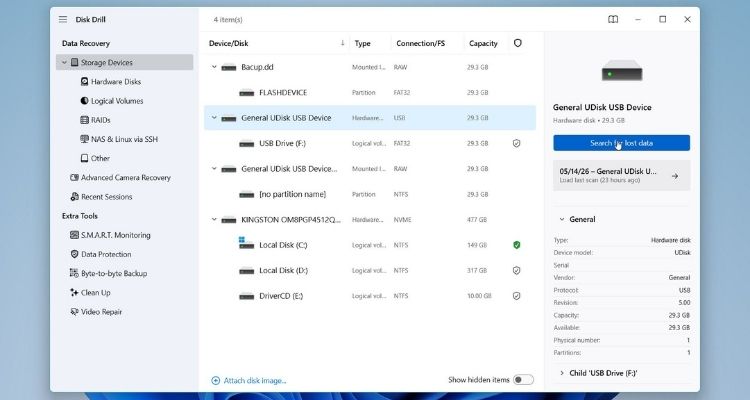
- Once open, you’ll see a list of all drives connected to your computer. Find your SD card in the list (if you’re not sure which one it is, the Size column makes it easy to identify), select it, and click Search for lost data.

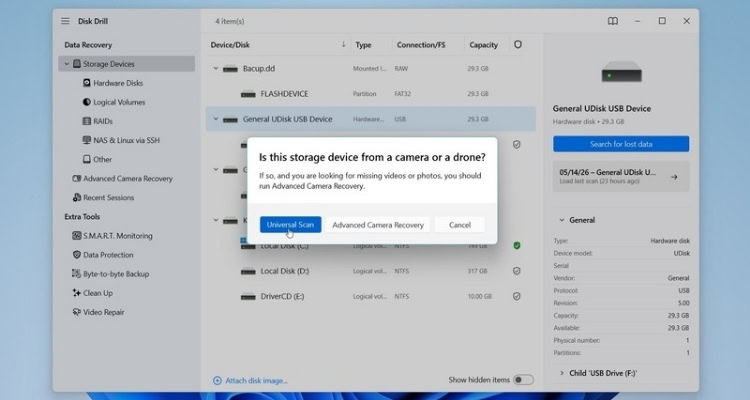
- You’ll be prompted to choose between Universal Scan and Advanced Camera Recovery. For photos, Universal Scan is the right choice in most cases. If you’re also recovering video footage, go with Advanced Camera Recovery instead, it handles video files better.
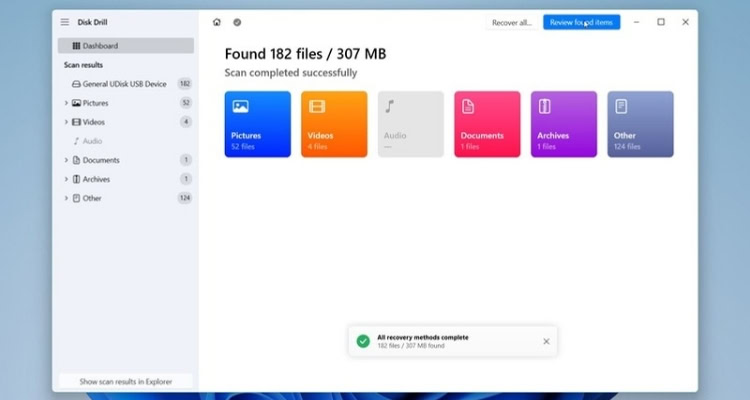
- Once the scan is complete, click Review Found Items to see what was recovered.
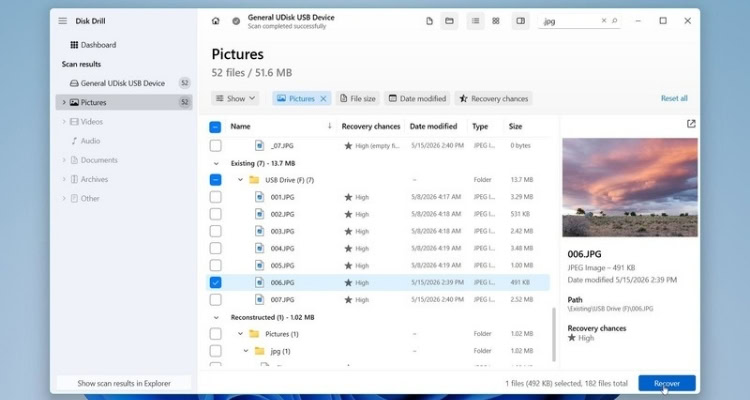
- Your files will be sorted into 3 categories: Deleted and lost, Reconstructed and Existing. To narrow down the results, you can use filters or search. The filters help separate photos by file type, size, or modification date, which becomes especially useful after scanning large DSLR SD cards with thousands of travel photos. You can focus only on image formats like JPG, PNG, TIFF, or RAW camera files such as CR2, CR3, NEF, ARW, RAF, ORF, and DNG. Disk Drill also allows you to search by filename or extension, which can speed up the process.
- The preview feature is especially important during photo recovery because it helps confirm that the files are actually recoverable before you restore them. Click any photo to preview it. If the image opens correctly and looks intact, recovery chances are usually very good. Select the files you need and click Recover.
- Choose a different storage location, not the original SD card and click Next to recover deleted photos.
After recovery finishes, take a few minutes to open multiple photos and videos to confirm they work correctly. Some damaged files may appear recoverable but fail to open fully, especially after severe corruption or partial overwriting.
Disk Drill for Windows allows free recovery of up to 100 MB of data, which is usually enough to restore several important travel photos and verify that the recovery works before deciding whether you need a paid license for a larger photo library.
Want to discover more hidden gems and helpful travel tips? Join our free newsletter for the latest travel secrets and travel articles.
We are reader-supported and may earn a commission on purchases made through links in this article.

- Exploring Nanjing, China: 48-Hour Trip That Changed My Perspective - October 13, 2026
- Buzzing into Sustainability: How Hotels Are Embracing Beekeeping Initiatives - October 13, 2026
- The Perfect Bay Area Day Trip: Why Sausalito Should Be Your Next Weekend Escape - October 13, 2026
Planning another trip soon? ✈️
Add GoWorldTravel.com as a preferred source on Google. Click the button below so our local guides, packing hacks, and hidden-gem itineraries always show up first when you search!
Add to Preferred Sources